Best Karaoke Video Maker: 2 Ways to Make Karaoke Videos
Mark Jensen | Updated on 2026-08-21
Creating a karaoke video can be as simple or as customizable as you want. Some workflows let you prepare the instrumental track and lyrics separately for greater control, while AI karaoke video makers can recognize lyrics and generate a complete video with fewer steps.
In this guide, we'll explore 2 ways to create karaoke videos. The first method uses separate tools for vocal removal, timestamped lyrics, and karaoke video creation, giving you more control over the final result. The second method uses an AI karaoke video maker to automatically recognize lyrics and create a lyric-based video from your song and an image or video.
What Do You Need to Create a Karaoke Video?
A karaoke video usually combines three main elements: karaoke audio, synchronized lyrics ,and visuals.
Karaoke Audio: For a traditional karaoke experience, the original lead vocals are usually removed from the song, leaving an instrumental track that you can sing along with. An AI karaoke maker can help you create a vocal-free instrumental track without manually editing the original audio.
Synchronized Lyrics: Lyrics need to appear at the right time as the song plays. Timestamped lyrics make it possible to synchronize each line with the audio.
Visuals: The lyrics can be displayed over a background image, video, or other visual elements. Together, these elements create the final karaoke video.
Method 1: Create a Karaoke Video With Separate Audio and Lyrics
The first method gives you more control over each part of the karaoke video. Instead of relying on one tool to handle everything, you prepare the instrumental track and lyrics separately, then combine them in karaoke software.
The general workflow is:
Original Song → Vocal Removal → Timestamped Lyrics → Edit Karaoke Video
Step 1. Remove Vocals From the Song
Create an instrumental version of your song by removing the original vocals. Open Clumi AI karaoke maker, upload your song, and let the AI process the audio. Preview the result, then download the instrumental track for the next step.
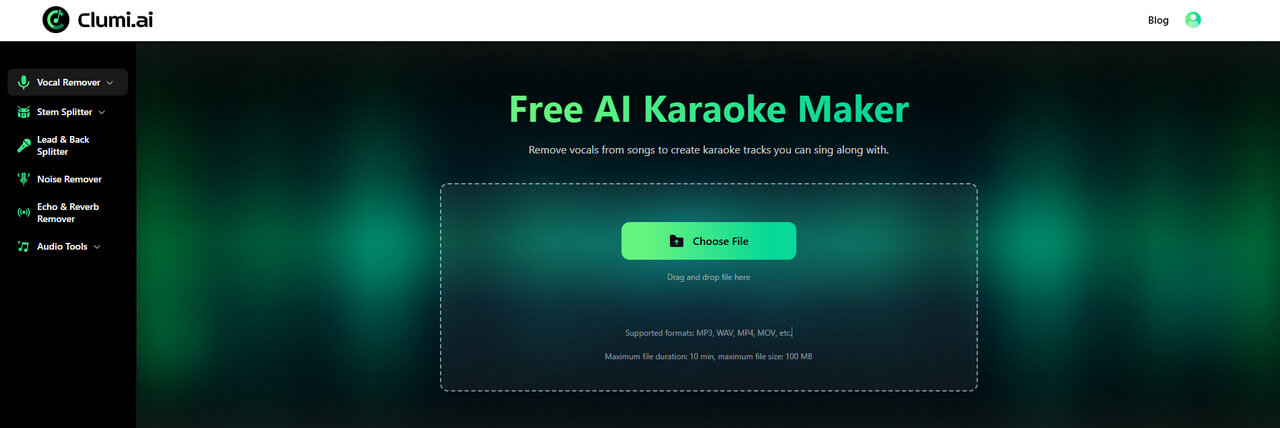
Clumi AI Karaoke Maker
Remove vocals from a song to make your own karaoke track with Clumi AI.
Step 2. Get Timestamped Lyrics
Next, prepare the lyrics for your song. For a karaoke video, timestamped lyrics are especially useful because they include timing information that keeps each line of lyrics synchronized with the music.
First, check whether your music platform, such as Apple Music or Spotify, provides synchronized lyrics for the song. You can also find timestamped lyrics with a free online lyric finder.
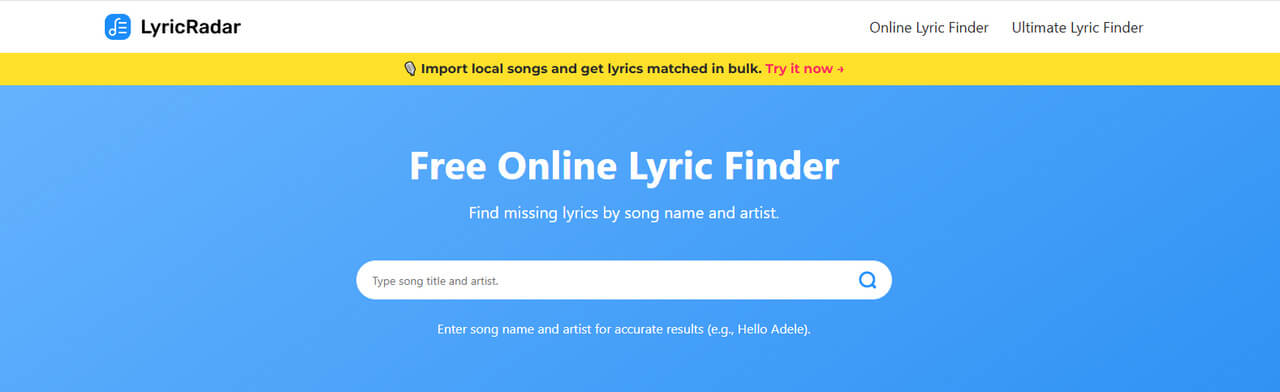
Before moving on, review the lyrics for spelling mistakes, missing lines, and timing errors to make sure everything is properly synchronized.
Tip: If you create karaoke videos regularly, using an AI lyrics synchronization tool can save you from timing each lyric line manually.
Step 3. Combine the Audio and Lyrics and Create Your Karaoke Video
Once you have your instrumental track and timestamped lyrics, import them into a video editor such as CapCut. Add the instrumental audio and lyrics to the project, then customize the lyrics, timing, and background visuals.
Before exporting, you can preview the video to make sure the lyrics are accurate and properly synchronized with the music. Once everything looks right, export your finished karaoke video.
Pros
- Fine-tune the instrumental track
- Adjust lyrics and timing as needed
- Timestamped lyrics can be checked before video creation
- Flexible choice of tools
- Suitable for users who prioritize quality and customization
Cons
- Requires multiple audio and video tools
- Takes more time and preparation
Method 2: Use an AI Karaoke Video Maker
If you want to create a karaoke video with fewer steps, an AI karaoke video maker can automate much of the process.
Instead of preparing the lyrics separately, you can upload your song and a background image or video. The AI analyzes the song, recognizes the lyrics, synchronizes them with the music, and generates a karaoke-style video.
The workflow is:
Upload Song + Image/Video → AI Lyrics Recognition → Preview → Generate Video
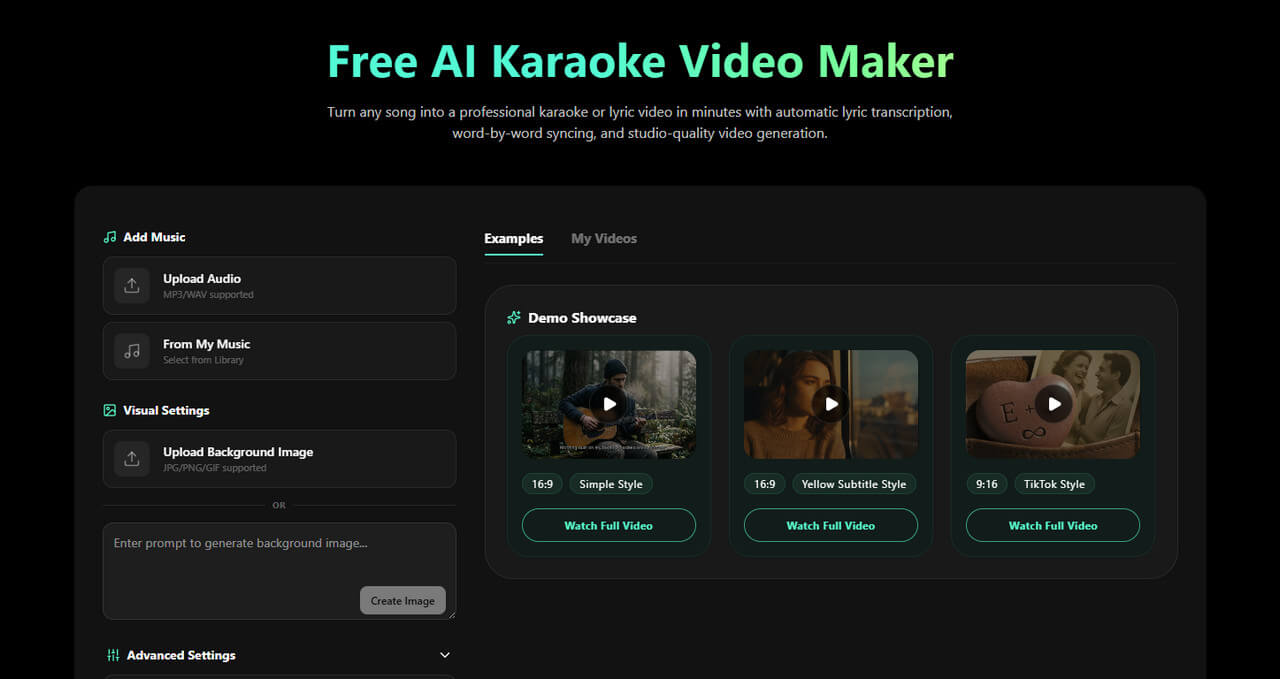
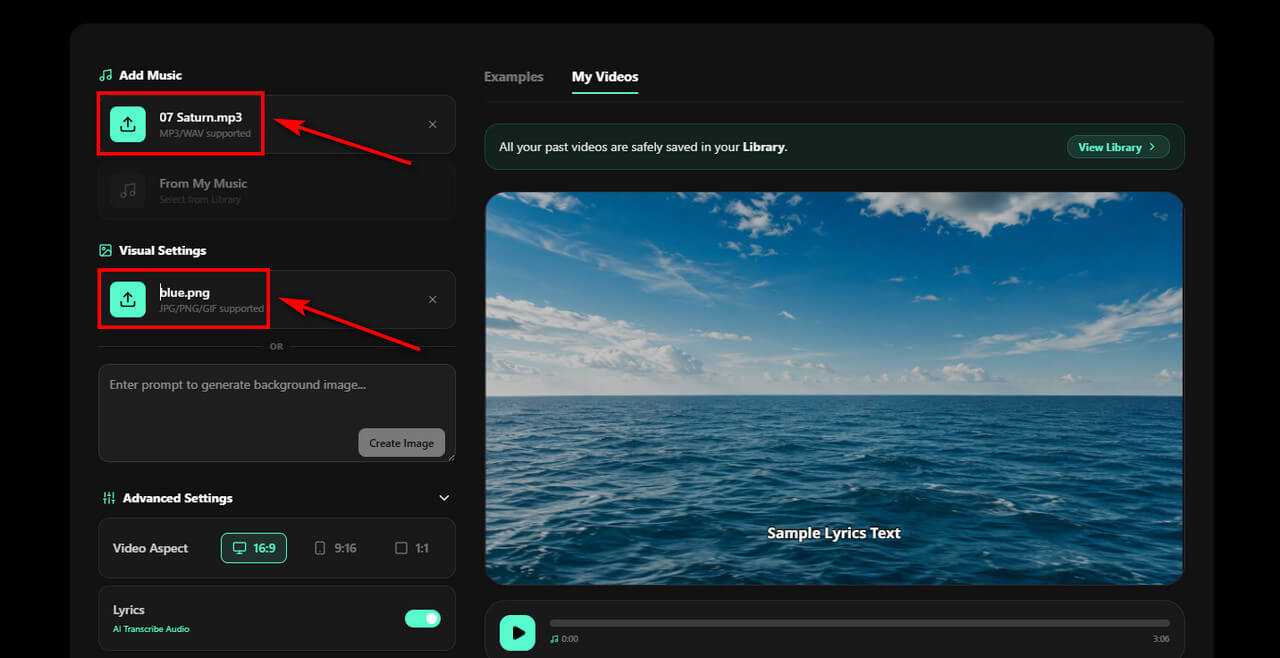
Step 1. Upload Your Song and Choose a Background
Start by uploading the song from your device or music library. You can also choose or generate a background image or visual for your karaoke video.
Once your song is uploaded, the AI automatically transcribes the lyrics and synchronizes them with the audio, so you don't need to prepare a separate timestamped lyrics file.
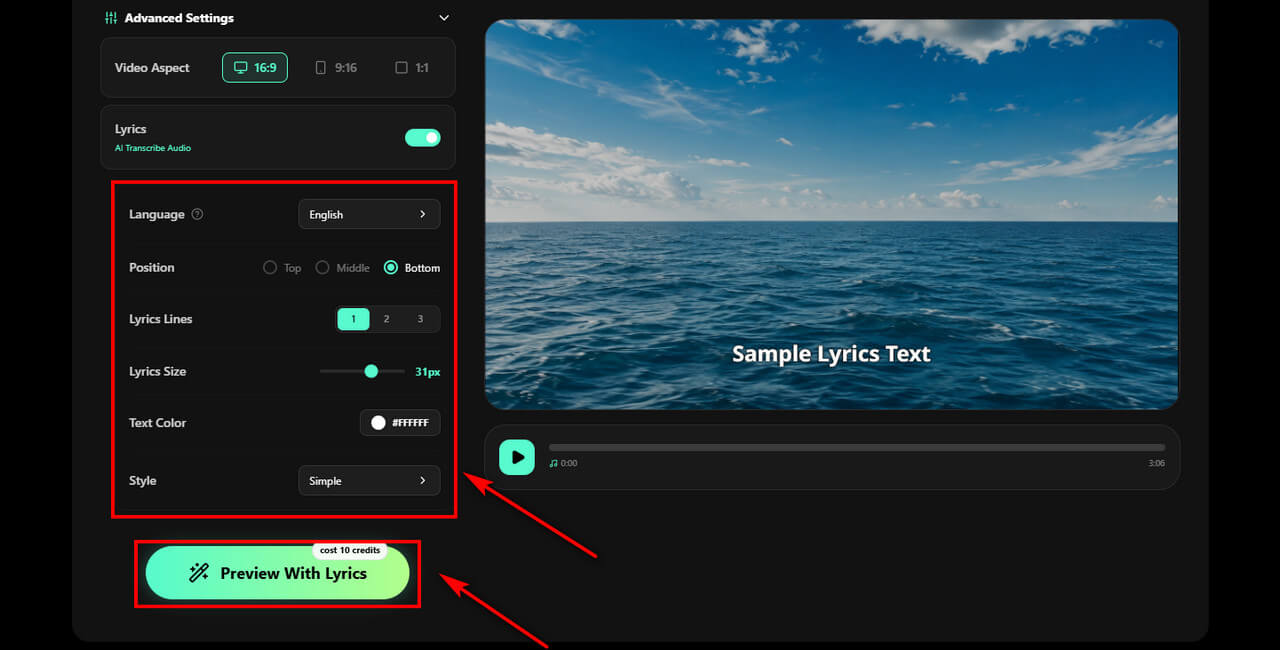
Step 2. Let AI Recognize and Synchronize the Lyrics
While the AI recognizes and synchronizes the lyrics, you can adjust the lyric position, font size, text style, and other visual settings to customize the look of your karaoke video. Click Preview With Lyrics to start generating the karaoke video.
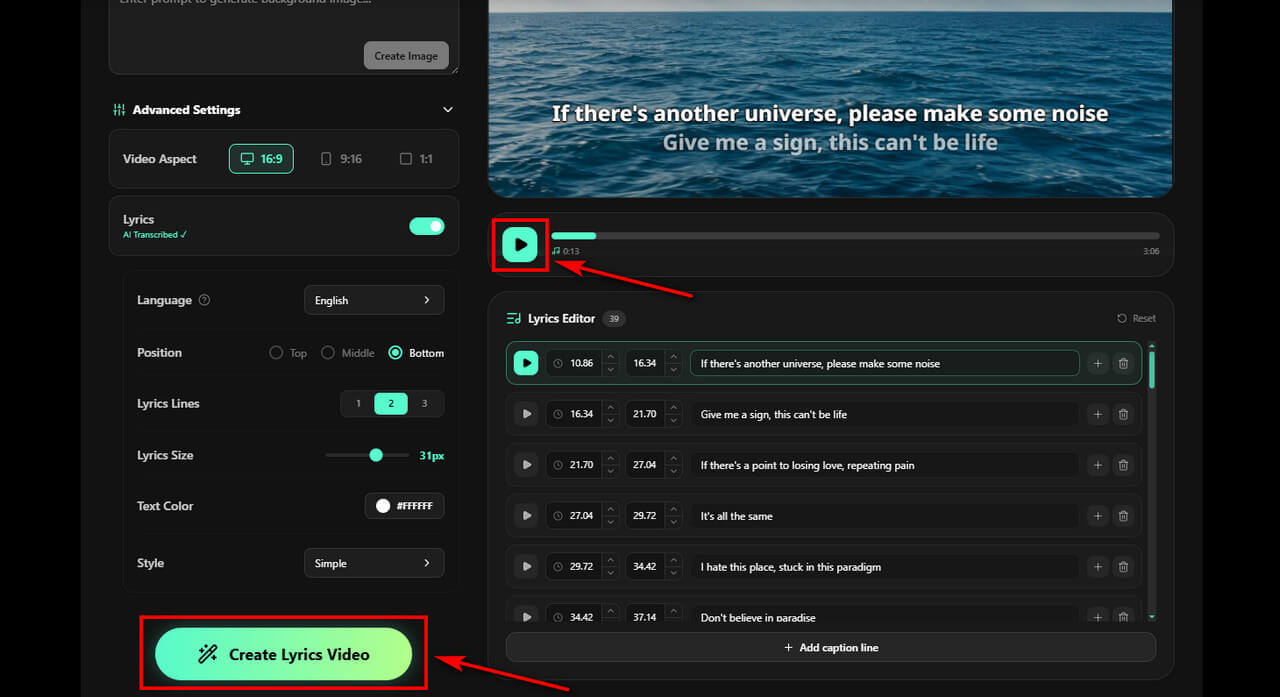
Step 3. Preview and Create Karaoke Video
Once you're satisfied with the lyrics and visual settings, preview the video to check the synchronization and overall appearance.
Click the button to generate your karaoke video, then download or share the finished video.
Pros
- Fast and convenient for beginners
- Fewer tools are required
- No need to prepare timestamped lyrics
- AI automatically recognizes and synchronizes lyrics
- Easy lyric style customization
Cons
- AI-generated lyrics may contain errors
Method 1 vs. Method 2: Which Is Better?
Both methods have their strengths. Method 1 gives you more control over the audio, while Method 2 is faster and easier to use.
| Feature | Separate Audio & Lyrics | AI Karaoke Video Maker |
|---|---|---|
| Vocal removal | Separate step | Depends on the tool |
| Timestamped lyrics | Prepared separately | AI-generated |
| Lyrics recognition | User-provided | Automatic |
| Audio control | Higher | Depends on the tool |
| Lyric control | Higher | Moderate |
| Setup time | Longer | Shorter |
| Number of tools | Multiple | Usually one |
| Manual work | More | Less |
| Best for | Quality and control | Speed and convenience |
Tips for Creating a Better Karaoke Video
1. Start With a High-Quality Audio File
A high-quality source file can improve the quality of the final karaoke audio. Avoid heavily compressed or distorted recordings when possible.
2. Check the Lyrics Carefully
Whether you prepare the lyrics yourself or use AI recognition, always check the final lyrics before exporting the video.
3. Make Sure the Lyrics Are Properly Synchronized
Even accurate lyrics can make a karaoke video difficult to use if they appear too early or too late. Preview the song and adjust the timing when necessary.
4. Preview the Instrumental Before Creating the Video
If you're using a vocal remover, listen to the instrumental track before moving on to video creation. This lets you identify any sections that may need attention before spending time on the visual part of the project.
5. Choose a Clear Background
Keep the background simple so the lyrics are easy to see. Make sure there is enough contrast between the text and the background.
6. Preview the Final Video Before Exporting
Watch the finished video from beginning to end and check the audio, lyrics, timing, and visuals before downloading or sharing it.
Conclusion
There are two practical ways to create a karaoke video. The first gives you more control by creating an instrumental track and preparing synchronized lyrics separately, while the second uses an AI karaoke video maker to automate lyrics recognition and video creation.
If audio quality and control are your priorities, Clumi AI karaoke maker can help you remove vocals and create an instrumental track for a more customizable workflow. If speed and convenience matter more, an all-in-one AI karaoke video maker can simplify the entire process.
Clumi AI Karaoke Maker
Remove vocals from a song to make your own karaoke track with Clumi AI.
FAQs About Karaoke Video Makers
1. What is the best way to create a karaoke video?
It depends on what you need. If you want a vocal-free karaoke track with greater control over the audio, Clumi can help you remove vocals and create an instrumental track.
2. Can I convert a song to karaoke?
Of course, Clumi AI karaoke maker can help you turn a song into a karaoke track by removing the original vocals. If you want to combine the karaoke track with an image or video, you can use an AI karaoke video maker.
3. How can I remove vocals from a song for karaoke?
You can use an AI karaoke maker. Upload your song, remove the vocals, and download the resulting instrumental track for karaoke.
4. Can I preview my karaoke video before exporting?
Yes. Most karaoke video makers let you preview the video before exporting, so you can check the lyrics, timing, and overall synchronization. Some also allow you to preview the video with the vocal track before creating the final file.
5. Can I create karaoke videos with lyrics?
Yes. Somio AI karaoke video maker can analyze a song and automatically recognize and synchronize its lyrics. You can review and correct the lyrics before generating the final video.