
How to Make Clean Acapellas for Mashups and Remixes
Mark Jensen | Updated on 2026-09-18
Want to make clean acapellas for mashups and remixes? If you only have a finished song, you may not have access to the original vocal stems. AI vocal separation makes it possible to extract vocals from a mixed track and use them with a new instrumental.
In this guide, we'll walk through how to create an acapella from a finished song, check the separation quality, and prepare the isolated vocal for your next mashup or remix.
Why Clean Acapellas Matter for Mashups and Remixes
A mashup combines vocals and instrumentals from different songs, while a remix uses an existing vocal performance as part of a new arrangement.
If you only have the finished track, the original instrumental is still mixed with the vocals. Extracting the vocal first gives you more flexibility to create mashups and remixes.
A cleaner vocal extraction also helps reduce unwanted drums, bass, and other instrumental sounds in the new mix.
Tips for Getting Cleaner Acapella Results
A few simple tips can help you get a more usable acapella for your mashup or remix:
- Use a high-quality source: The quality of the original track can make a difference. If possible, use the highest-quality version you have rather than a heavily compressed file.
- Check for unwanted sounds: Listen for residual drums, bass, instruments, or vocal artifacts after separation.
- Listen in context: An acapella that sounds good on its own may work differently in a full mix. Put it together with your new instrumental and listen for anything that stands out before making further adjustments. Here are the extracted acapella and instrumental
- Export in WAV when possible: If you're planning to edit or mix the vocal in a DAW, WAV is a good choice when available. It gives you a high-quality file to work with during the next stage of your project.
How to Make Clean Acapellas for Mashups and Remixes
For a faster and more convenient way to create an acapella, you can use an AI vocal separation tool to assist with the process. Clumi AI acapella extractor can separate vocals from the instrumental and provides high-quality WAV downloads for further editing and mixing.
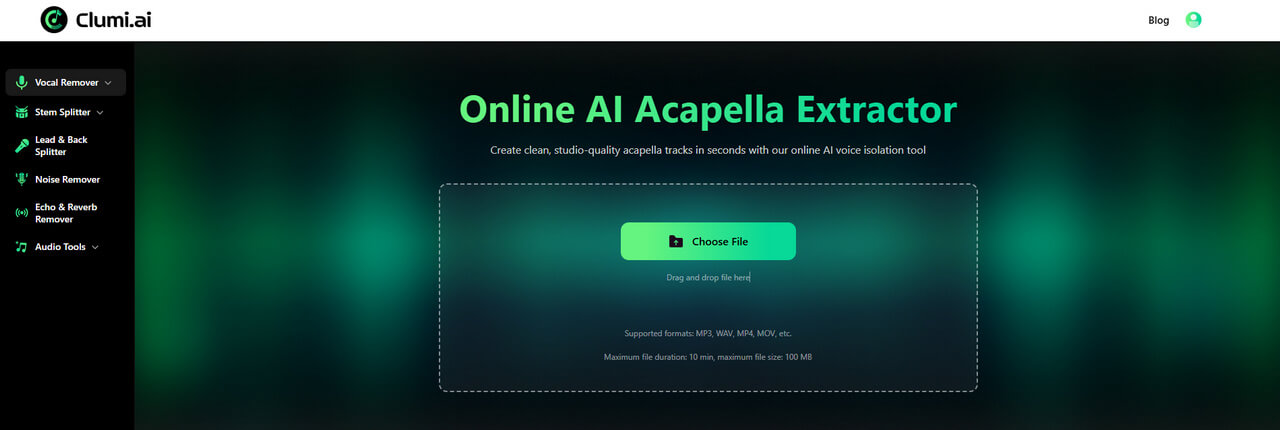
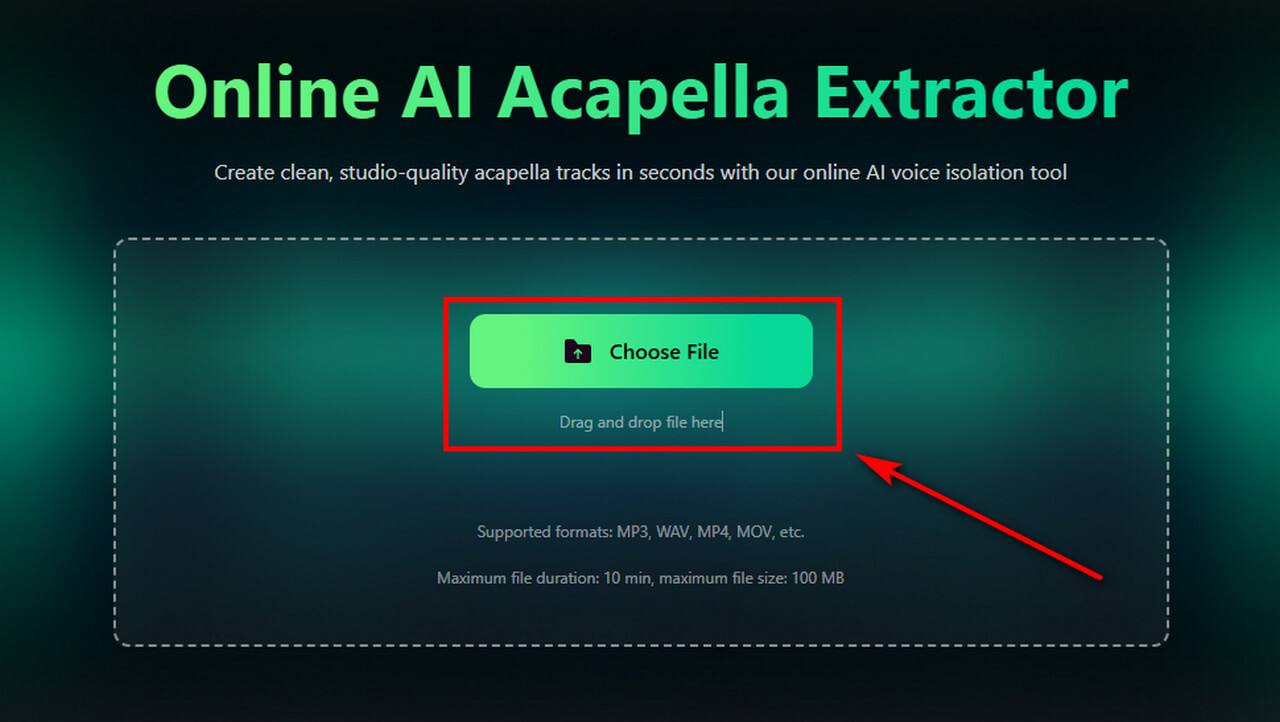
The steps below explain how to use it to create a clean acapella for your mashup or remix.
- Upload your song to Clumi AI Acapella Extractor to separate the vocals from the instrumental. For better separation results, use the highest-quality version of the track available.
- Once your file is uploaded, let the AI process the audio. The tool will analyze the track and separate the vocal from the instrumental.
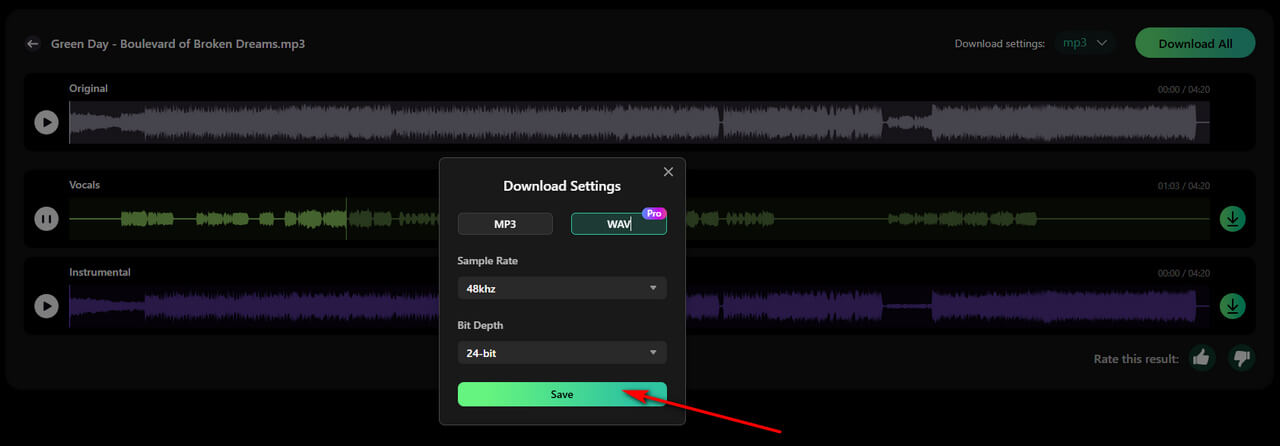
- Listen to the isolated vocal and make sure the separation sounds clean. Once you're satisfied with the result, select a higher sample rate and bit depth, then click Save to save your settings.
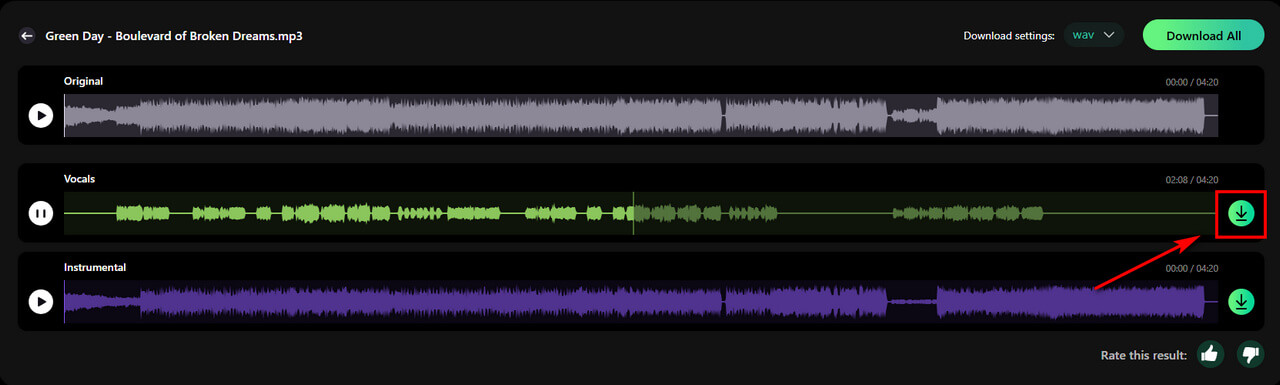
- Click the Download button to save the isolated vocal. If you also need the instrumental, click Download All to download both tracks at once.
Clumi AI Vocal Remover
Remove vocals from songs for karaoke, remixing, music production, and more.
What Can You Do With a Clean Acapella?
Once you've created a usable acapella, there are several ways to incorporate it into music projects.
Create Mashups
Combine vocals from one song with an instrumental from another. You can experiment with different combinations of genres, tempos, and arrangements.
Make Remixes
Use an existing vocal performance as the starting point for a new production. Build new drums, bass, synths, or other instrumental layers around the vocal.
Experiment With New Arrangements
An isolated vocal gives you more flexibility to change the musical context around a performance. You can try different instrumentals, effects, tempos, or song structures without the original accompaniment.
Practice Vocal Production
An acapella can also be useful for experimenting with EQ, compression, reverb, delay, and other vocal-processing techniques.
Conclusion
You don't need access to the original vocal stems to make clean acapellas for mashups and remixes. Starting with a finished song, AI voice isolation can help extract the vocal and provide a workable foundation for a new arrangement.
For better results, use a high-quality source, check the isolated vocal for instrumental bleed, and compare separation results when necessary. With a browser-based tool like Clumi, you can separate vocals from a finished track and prepare the result for your next mashup or remix.
Clumi AI Vocal Remover
Remove vocals from songs for karaoke, remixing, music production, and more.
Frequently Asked Questions
1. Can I make an acapella from any song?
You can create an acapella from most finished songs. Just upload your music to an AI audio separator, it will help you isolate vocals from audio automatically.
2. How can I get a cleaner acapella?
There are two common ways to get a clean acapella. You can obtain an official vocal track from a trusted source, or extract the vocals yourself from a finished song. If you're extracting it yourself, use a high-quality track and choose a reliable AI acapella extractor for better results.
3. Can I use an acapella for a mashup?
An isolated vocal can be combined with an instrumental from another song to create a mashup. If you plan to use the mashup commercially, make sure you have the necessary rights and check any copyright or licensing restrictions first.
4. Should I export an acapella as WAV?
WAV is a good choice if you plan to continue editing or mixing the vocal in a DAW, as it provides high-quality audio for further processing.
5. Can I edit the acapella after extracting it?
Yes. You can make further edits to the extracted vocal, such as trimming sections or adjusting its timing and pitch. A DAW like Logic Pro or Audacity can help you prepare it for your new mix.